click ID tracking for SaaS
Click ID Tracking for SaaS: How gclid, fbclid, msclkid, and ttclid Reach Your Payment Records
gclid, fbclid, msclkid, and ttclid explained for SaaS: what each proves, why they disappear before checkout, and how to carry them first-party into your payment records.
What a click ID is, and what it is not
Concise answer
A click ID proves that a specific ad click reached your site. It does not describe the campaign in words, and it does not prove the click caused a purchase.
Each major ad platform documents its own identifier. Google's auto-tagging is described as a feature that automatically adds a parameter to your URLs to help you track offline conversions and report on your ad performance; the parameter is the Google Click Identifier, gclid, attached to the URL your customers click. Google also documents gbraid, a privacy-preserving identifier used to measure ad performance that measures conversions in a non-unique fashion, like a campaign ID, without linking them to individual users or events; it is case sensitive and must not be changed. Meta's Conversions API documentation says the click ID is passed with the URL of an advertiser's website when a user clicks an ad on Facebook or Instagram, as the fbclid query parameter, and describes how the Meta Pixel stores it in a first-party cookie formatted as version, subdomain index, creation time, and the fbclid value.
Microsoft Advertising documents that auto-tagging of Microsoft Click ID automatically adds a unique click ID, msclkid, to the landing page URL, that it is enabled by default, and that it exists so conversions are still tracked when the Microsoft cookie cannot be returned because of browser settings such as third-party cookie blocking. TikTok describes ttclid as a tracking parameter appended to a landing page URL when you click on an ad on TikTok, matched back to actions on TikTok when events shared through its Pixel or Events API contain the ID.
The distinction from UTM parameters is the one that trips up most teams. UTMs are yours: you write utm_source, utm_medium, and utm_campaign, and any analytics tool can group visits by them. Click IDs are the platform's: opaque strings that only the issuing platform can decode, generated per click. A UTM tells you the campaign. A click ID tells you that this visit came from a real, billable click on that platform. You want both on the same landing URL, and you want both to survive to the payment.
| Parameter | Platform | Appended by | Documented purpose | Notes |
|---|---|---|---|---|
| gclid | Google Ads | Auto-tagging | Offline conversion import and ad performance reporting | gbraid and wbraid are privacy-preserving variants for iOS measurement |
| fbclid | Meta (Facebook, Instagram) | Ad click | Matching events sent via Pixel or Conversions API | Pixel stores it in the _fbc first-party cookie |
| msclkid | Microsoft Advertising | Auto-tagging, on by default | Conversion tracking when the Microsoft cookie is unavailable | Can be disabled at the account level |
| ttclid | TikTok Ads | Ad click | Attribution, audiences, and delivery optimisation | Validity follows the click-through window in Attribution Manager |
| utm_* | Any | You | Campaign grouping in any analytics tool | Human-readable; not a proof of a billable click |
Why click IDs disappear before a SaaS payment
Concise answer
E-commerce loses click IDs in minutes. SaaS loses them over days, across a trial, and across a domain boundary, which is why paid campaigns look unattributed at the moment of payment.
The ID arrives on the very first URL and nowhere else. Everything after that first pageview is a chance to lose it.
The landing page rewrites the URL
Client-side routers, canonical redirects, locale redirects, and trailing-slash normalisation can all replace the URL before your script runs. A redirect that reconstructs the path without the query string drops every parameter at once. The symptom is a paid campaign whose visits show up as direct. If you see that pattern, the UTM parameters lost at checkout guide walks through where the handoff breaks.
The trial gap
A SaaS buyer clicks an ad, starts a trial, and pays on day seven or day fourteen from a different tab, often from a bookmarked app URL that never carried the ID. Unless the ID was written to first-party storage on day one and read back on the day of payment, the payment has no way to reference the click. Ad platforms handle this with their own cookies and conversion windows; your own records need an equivalent.
The checkout lives on another domain
Hosted checkouts run on the provider's domain. Your browser storage does not follow the user there. The only channel that crosses that boundary is the metadata you attach when you create the checkout session on your server. Whatever you do not put in metadata is not in the webhook.
The script loads too late
Consent banners, deferred script loading, and client-side route changes can all mean your tracker first runs on a URL that no longer carries the parameter. If your tracker is gated behind consent, the visitor may have navigated to a second page before consent is given, and the landing URL with the ID is gone. The fix is to read and store the query string in your own first-party code at page load, then hand the stored record to the tracker once it is allowed to run. Note that some visits will never be recorded by design: Metrivo's tracker halts initialisation when the browser sends a Do Not Track signal and honours a local opt-out key, so those visits carry no click ID into your records at all, and that is the correct outcome for them.
The browser removes the ID before you see it
Apple's WebKit team describes Private Browsing in Safari 17 and later as removing query parameters identified as being used for pervasive cross-site tracking granular to users or clicks, prior to navigation, so the values are never propagated over the network, while allowing campaign attribution parameters through. In that mode, third-party scripts that read the page URL receive a version without any query parameters, and cross-site referrers are hidden from script. The practical consequence is that a share of paid visits will never carry a click ID no matter how well you store it. Those visits should remain classified by whatever evidence survives, usually the UTMs, and otherwise stay unknown.
The first-party pattern that survives the trial
Concise answer
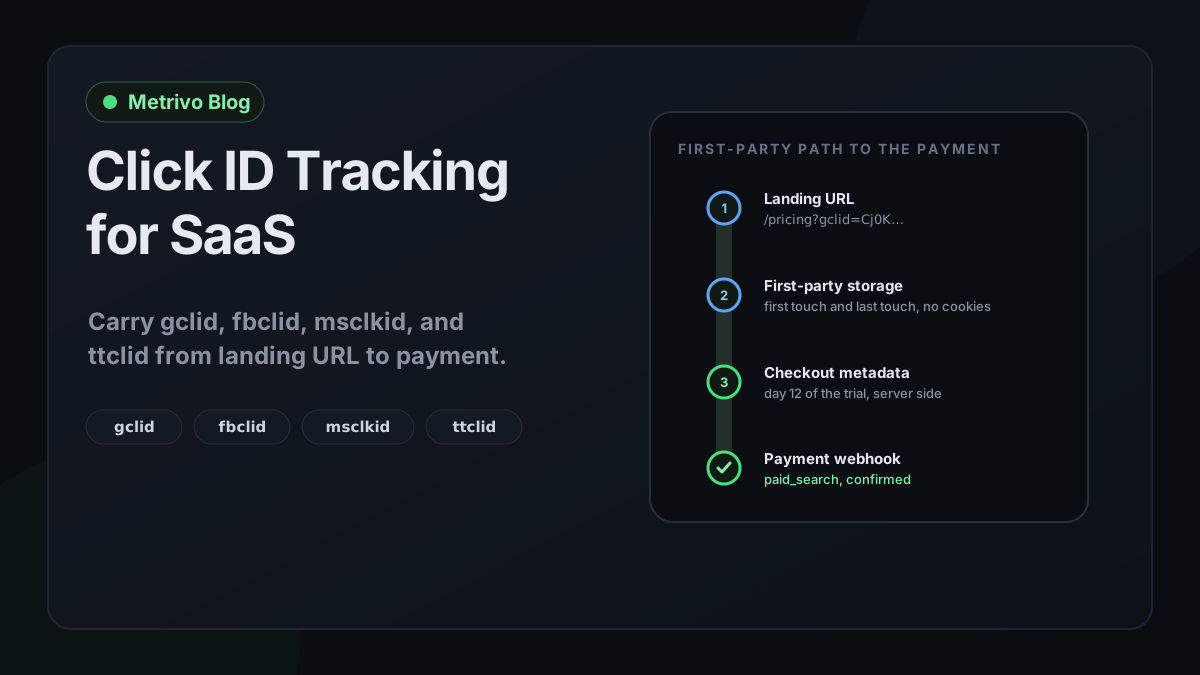
Capture at first pageview, persist in first-party storage, hand off as checkout metadata, classify at webhook time. Four steps, each with an inspectable output.
This pattern is not specific to any tool. It is the minimum that makes a click ID usable weeks later.
Capture at the first pageview
Read the query string as early as possible, before any router or redirect rewrites it. Record the click IDs together with the UTMs, the referrer, and the landing path, because they are evidence about the same visit. Metrivo's tracker reads gclid, fbclid, msclkid, and ttclid alongside the UTM fields on every pageview and includes them in the event payload.
Persist a first-touch and a last-touch record
Keep two records: the first campaign that ever brought this visitor, and the most recent one. Both matter. A buyer who first arrived from a Google ad and returned from a retargeting ad on Meta has a story that neither record tells alone. Metrivo stores both records in the browser's local storage rather than cookies, keyed to a first-party anonymous visitor identifier, and does not track a visitor across different customer websites. The last-touch versus multi-touch attribution guide covers how to read the two records once they reach the payment.
Hand off at checkout creation
When your server creates the checkout session or subscription, read the stored records and attach them as provider metadata. Metrivo exposes a helper on the tracker that returns the current attribution record for exactly this purpose, and its metadata contract accepts the visitor and session identifiers, the landing URL, the referrer, the five UTM fields, and the four click IDs. The provider copies metadata onto the resulting objects, so the webhook that reports the payment carries the click ID with it. The Stripe integration documentation shows where this happens for Stripe Checkout, and the source-to-revenue tagging documentation covers the general contract.
Classify when the webhook arrives
Once the payment carries identifiers, classification is deterministic. Prefer a session or visitor match, because it connects the payment to the entire journey. Fall back to the metadata fields on the payment itself when no session can be matched. Either way, record which evidence produced the classification, because a payment classified from a click ID in metadata and a payment classified from a full session are not equally informative.
How Metrivo classifies click IDs
Concise answer
A click ID sets the channel and raises confidence to confirmed at session time, and provides a paid source at payment time when no session can be matched.
Metrivo's channel classifier checks click IDs before it looks at UTM medium. A session that arrived with fbclid or ttclid is classified as paid social; a session with gclid or msclkid is classified as paid search. Only afterwards does the classifier consider the medium value, email mediums, AI-search referrers, direct, organic search, and social referrers. The attribution confidence rule is stricter still: any of the four click IDs marks the session's source as confirmed, the same level as a complete UTM source and medium pair or a referrer from a known search engine or social network. A UTM source on its own without a click ID or medium is only inferred.
At payment time the engine tries session hints first, including the metrivo session identifier and the provider's client reference, then visitor identifiers, then a hashed customer email match. If none of those resolve, it falls back to the payment's own metadata, and there the click IDs act as a source of last resort: gclid resolves to google with medium cpc, msclkid to bing with medium cpc, fbclid to facebook with medium paid social, and ttclid to tiktok with medium paid social, unless explicit UTM values in the metadata already say otherwise. That fallback keeps a paid payment out of the unattributed bucket when the checkout metadata carried the ID but the session could not be matched, and the attribution confidence documentation explains how the resulting match is labelled.
| Signal present | Session channel | Session confidence | Payment fallback source and medium |
|---|---|---|---|
| gclid | paid_search | confirmed | google / cpc |
| msclkid | paid_search | confirmed | bing / cpc |
| fbclid | paid_social | confirmed | facebook / paid_social |
| ttclid | paid_social | confirmed | tiktok / paid_social |
| utm_source and utm_medium, no click ID | By medium | confirmed | From the UTM values |
| utm_source only | By source | inferred | From utm_source |
| Nothing survived | direct or unknown | unknown | Stays unattributed |
What Metrivo does not do with click IDs
The current tracker captures four identifiers: gclid, fbclid, msclkid, and ttclid. It does not capture gbraid, wbraid, dclid, LinkedIn's li_fat_id, or X's twclid, so iOS-only Google measurement that relies on gbraid or wbraid is not recorded and stays unknown. Metrivo also does not send your customers' conversions back to Google Ads, Meta, Microsoft, or TikTok; the IDs are recorded as evidence for your own revenue reporting, not uploaded to the platforms. If you need offline conversion import or a conversions API integration, that is a separate system, and the click ID stored in your payment metadata is the value you would use to feed it.
Reading the result honestly
Concise answer
A click ID on a payment proves the visit came from a billable click. It does not prove the ad caused the purchase, and it cannot cover the visits where the browser removed it.
Three limits are worth stating in your reporting. First, presence proves the click, not causation: a customer who already intended to buy and clicked a branded ad on the way in will carry a gclid. Second, the last-touch record over-credits retargeting by construction, and the first-touch record over-credits discovery; read them together. Third, coverage is partial. Private Browsing strips the IDs, some corporate proxies rewrite URLs, and some users arrive on a bookmarked link. Report the share of paid-campaign payments that carried an ID, and keep the rest visible as unknown instead of allocating them proportionally.
None of this makes click IDs less useful. It makes the reporting honest. The revenue attribution guide covers how confirmed, inferred, and unknown matches should be presented side by side, and the GDPR-friendly attribution guide covers why first-party storage without cookies is the right default for this data in the first place.
A twenty-minute test
Concise answer
Prove the path end to end with one fake click ID and one sandbox payment before you trust a month of reports.
Open your landing page with a made-up parameter such as gclid=test-click-001 and, if you use UTMs, a matching utm_source and utm_medium. Confirm the value was stored: in Metrivo's case, the first-touch record in local storage should contain it, and the verify tracking documentation shows how to confirm the pageview arrived with its properties. Navigate to another page, close the tab, and come back through a bookmark to simulate the trial gap; the stored record should still be there.
Then start a sandbox checkout from your own signup flow, not from the provider's test button, so that your server's checkout creation code runs. Inspect the metadata on the resulting checkout session or subscription in the provider's dashboard; the test click ID should be present. Complete the test payment and check the webhook payload your handler received. Finally, confirm the payment was classified as paid search with confirmed confidence and that the fallback fields on the payment carry google and cpc.
If the ID is missing at any step, you have found the exact boundary where it is lost. The most common failures, in order, are a redirect on the landing URL, a checkout created without reading the stored record, and a webhook handler that ignores metadata. If you want Metrivo to run this path for one website and one payment path, use the Add my website flow on the homepage; the separate demo is a seeded sample and does not test your own URLs.
- Landing URL with gclid=test-click-001 loads without a redirect that drops the query string.
- First-touch record in first-party storage contains the click ID and the landing path.
- Record survives a new tab and a bookmark visit.
- Checkout session metadata in the provider dashboard contains the click ID and the visitor identifier.
- Webhook payload received by your handler contains the same metadata.
- Payment is classified paid search, confidence confirmed, source google, medium cpc.
Frequently asked questions
What is the difference between a click ID and a UTM parameter?
A UTM parameter is a campaign label you write yourself, readable by any analytics tool. A click ID is an opaque identifier the ad platform generates for one click, which only that platform can decode. A UTM tells you the campaign; a click ID proves the visit came from a billable click on that platform. Use both on the same landing URL.
Does Safari remove gclid and fbclid?
In Private Browsing, Safari 17 and later removes query parameters identified as being used for click-level or user-level cross-site tracking before navigation, while allowing campaign attribution parameters through. Visits affected by this will carry UTMs but no click ID, so classify them from the UTMs and otherwise leave them as unknown.
How do I pass gclid to Stripe?
Store the gclid first-party when the visitor lands, then read it on your server when you create the Stripe Checkout Session or Subscription and attach it as metadata together with your visitor and session identifiers. Stripe copies metadata onto the resulting objects, so the payment webhook arrives carrying the gclid.
Does Metrivo send conversions back to Google Ads or Meta?
No. Metrivo records gclid, fbclid, msclkid, and ttclid as attribution evidence for your own revenue reporting. It does not upload conversions to any ad platform. The stored click ID in your payment metadata is the value you would use in a separate offline conversion or conversions API integration.
What happens when the click ID is missing at payment time?
Metrivo tries session and visitor matches first, then a hashed email match, then the payment's own metadata. If nothing resolves, the payment stays visible as unattributed revenue rather than being assigned to a source. A missing click ID lowers coverage; it should not silently inflate a channel.
Which click IDs does Metrivo capture?
The current tracker captures gclid, fbclid, msclkid, and ttclid. It does not capture gbraid, wbraid, dclid, li_fat_id, or twclid, so measurement that depends on those parameters is not recorded and remains unknown.