
is it safe to give an analytics tool your Stripe API key
Is It Safe to Give an Analytics Tool Your Stripe API Key? A Restricted-Key Checklist
Before you paste a Stripe key into an analytics tool: restricted vs secret keys, the minimum read permissions, what read access still exposes, storage, revocation, and red flags.
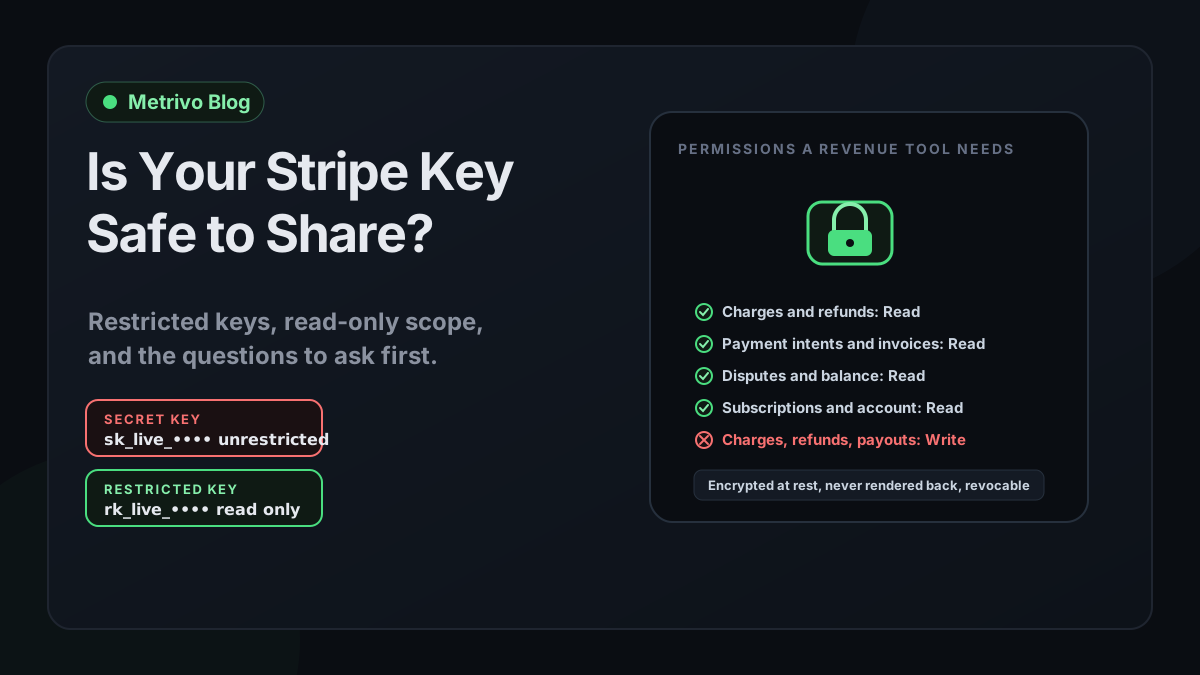
What a Stripe key can actually do
Concise answer
The risk of sharing a key is entirely defined by its type and permissions. Read the prefix before you read the tool's privacy page.
Stripe's key documentation defines the types plainly. A publishable key, prefixed pk_, can identify your account and create tokens or payment methods from card details, but it cannot perform sensitive operations such as creating charges or reading account data, which is why it is safe in front-end code. A restricted API key, prefixed rk_, is a key with permissions you control: when you create one you choose, for each Stripe resource, whether the key can Read, Write, or do nothing. A secret key, prefixed sk_, has unrestricted permissions on all Stripe APIs. Stripe states that because you cannot limit a secret key's permissions, it does not recommend secret keys for new use cases and recommends migrating existing usage to restricted keys.
The same documentation is direct about third parties. In its comparison table, sharing a secret key with a third party is labelled dangerous because it gives full control to the third party, while a restricted key is labelled safer because you hand out only the access the third party needs. Stripe's stated preference is to use restricted keys wherever possible, and it adds that restricted keys should still be treated with the same caution as secret keys.
One more distinction matters for analytics tools. Webhook signing secrets are not API keys. They are per-endpoint secrets your receiver uses to verify that an inbound event came from Stripe. A tool that only needs a signing secret cannot make any request to your Stripe account. Its exposure risk is different in kind: a leaked signing secret lets someone forge events into that tool's endpoint, which is a data-integrity problem for the tool, not an account-access problem for you.
| Key | Prefix | What it can do | Sharing with a tool |
|---|---|---|---|
| Publishable key | pk_ | Identify the account, tokenise card details in the browser | Safe to expose; not useful for revenue analytics |
| Restricted key | rk_ | Only the Read, Write, or None permissions you assign per resource | Acceptable when scoped to reads the tool can justify |
| Secret key | sk_ | Unrestricted access to every Stripe API | Stripe calls this dangerous; do not hand it to any third party |
| Webhook signing secret | whsec_ | Verifies inbound events at one endpoint; makes no API requests | Lower risk; sufficient for attribution-only integrations |
The questions to ask before you paste a key
Concise answer
Six questions separate a tool that treats your key as a liability from one that treats it as a convenience.
The tool's answers should be visible in its product or documentation, not only in a sales conversation. Where an answer is missing, treat the missing answer as the answer.
| The tool asks for | What it enables | Reasonable when | Red flag when |
|---|---|---|---|
| Read on charges, payment intents, invoices | Listing payments and their states | The job is revenue reporting or reconciliation | Never a red flag on its own |
| Read on balance transactions | Fees, net amounts, payouts | The tool reports net revenue or reconciles fees | The tool only reports gross revenue |
| Read on disputes, refunds | Chargebacks and refund states | The tool adjusts revenue for reversals | The tool never shows refunds |
| Read on customers | Customer names, emails, metadata | Matching payments to accounts or visitors | No matching feature exists |
| Write on webhooks | Creating or editing endpoints in your account | You explicitly want automated webhook setup | It is required rather than optional |
| Write on charges, refunds, payouts, transfers | Moving money | Almost never for an analytics tool | Any analytics tool asking for it |
| An sk_ secret key | Everything | Never for a third party | The form accepts it |
Does it reject secret keys?
A tool that validates the key format and refuses anything beginning with sk_ has made a design decision to limit what it can hold. A tool that accepts either type quietly has not. This is the cheapest test you can run: paste a sandbox secret key and see whether the form refuses it.
Which permissions does it require, and can it justify each?
Stripe's guidance for building a restricted key is to map each API call the integration makes to a permission: GET requests need Read, POST and DELETE requests need Write, and Write implies Read. A reconciliation tool that lists charges, invoices, disputes, and balance transactions needs Read on those resources and nothing else. Write on any resource means the tool can change something in your account, so each Write should have a named reason.
Published permission lists make comparison possible. PostHog's Stripe documentation, for example, lists Read on balance transaction sources, charges and refunds, customers, disputes, payment methods, payouts, products, coupons, credit notes, invoices, prices, and subscriptions, plus Read on Connect, and asks for Write on webhooks only if you want it to create the real-time sync webhook for you. A broader scope can be legitimate for a broader job. The question is whether the tool explains the job each permission serves.
How is the key stored, and can anyone read it back?
Stripe tells you to store keys in a secrets vault or, failing that, environment variables, and never in source code. A tool holding your key on your behalf should meet at least that bar: encryption at rest, a write-only input that never renders the full key back to a browser, and at most a last-four hint so you can recognise which key is saved.
Can you see what it does with the key?
Stripe lets you view request logs per key from the API keys page. If you give a tool its own restricted key, every request it makes is attributable to that key, and you can audit whether the calls match what the tool promised. That is Stripe's own recommendation: one restricted key per service or use case, so a compromise of any one service is limited to that key's permissions.
Can you revoke it, and what happens to your data when you do?
Rotating or expiring a key in Stripe cuts the tool off immediately, or after a delayed expiration of up to seven days if you want a safety window. The tool should say what it keeps after revocation. Historical evidence that was already derived from reads is usually retained; the tool should not need the key to keep showing you what it already computed.
What does read access still expose?
Read is not nothing. Read on customers returns customer records, which include names and email addresses. Read on charges returns amounts, currencies, and the customer they belong to. Stripe's example of a tightly scoped key is one that can only read dispute data: if a bad actor obtained it, they could only read dispute data and could not create charges, access customer payment methods, or trigger payouts. The same logic applies to any read-only key: no money movement, but real customer data. Scope the reads to what the job needs and treat the tool as a data processor for what it can see.
A minimal permission set for revenue analytics, with a worked example
Concise answer
For read-only reconciliation, seven Read permissions cover payments, invoices, disputes, fees, subscriptions, and account identity. Anything beyond that needs a stated reason.
Metrivo's Revenue Assurance code declares the exact permissions it needs, which makes it a concrete example rather than a hypothetical. The required list is connected account read, charge read, payment intent read, invoice read, dispute read, balance read, and subscription read. Each maps to a read stream the reconciliation uses: charges and refunds, payment intents, invoices and invoice payments, disputes, balance transactions, and subscriptions, plus the account identity call that binds the key to one Stripe account and mode.
Validation is done by probing rather than by trusting a declaration. When you save a key, Metrivo calls the list endpoint for each stream. A 401 or 403 response marks that stream forbidden and the corresponding permission is reported as missing. If a declared permission ends in write, it is flagged as disallowed. Metrivo's Stripe documentation also states the limit of this approach honestly: Stripe may not expose every additional grant on a manually created key, so Metrivo reports the validation limit instead of claiming cryptographic minimum privilege. In other words, the tool can prove it has the reads it needs; it cannot prove you gave it nothing extra. That part is on you when you create the key.
Creating the key in Stripe takes a few minutes. On the API keys page, choose Create restricted key, name it for the tool, set Read on the resources above and None on everything else, complete the two-factor verification, and copy the key once; Stripe does not show it again. If you cloned an existing key, check that no inherited Write permission survived.
What Metrivo does with the key once it has it
The shape check runs before any network call: a value beginning with sk_live_ or sk_test_ is rejected with the message that secret keys are unrestricted and cannot be used for read-only reconciliation, and anything that is not an rk_ key is rejected as well. The input is write-only; the full key is encrypted server-side using authenticated AES-256-GCM envelope encryption keyed from a server secret that production refuses to start without, and it is never rendered back to the browser. The interface shows only a saved marker with the last four characters.
Every subsequent call is a list or account-retrieve request; the adapter exposes no create, update, or delete method, and the product documentation states that the key cannot create charges, refunds, transfers, or payouts. Removing the key stops new source checks while historical evidence and decisions are preserved, so revocation does not erase what you already learned. Signed attribution, the path that connects payments to sessions, needs only the webhook signing secret, which is also encrypted and never rendered back; the restricted key is required only for independent reconciliation.
The same questions for other providers
Providers differ in what a read-only credential even looks like, and an honest tool says so. In Metrivo's current code, Paddle requires a current permission-capable API key with transaction, adjustment, and subscription read permissions, and legacy keys are rejected. Razorpay reconciliation uses an OAuth authorisation that must carry the read_only scope, and an expired authorisation requires reconnecting rather than silently continuing. Dodo Payments requires an API key created with write access disabled, and Metrivo states that Dodo does not expose grant introspection, so it cannot independently prove that write access is off. Lemon Squeezy and Polar are connected through webhook signing secrets only. The Manual Payment API is the reverse direction: you create a Metrivo key with a payments write scope, and every request is checked against the workspace and website that own it.
Revocation and rotation: the exit plan
Concise answer
Decide how you will take the key back before you hand it out. Stripe gives you rotation with a grace period, expiry, request logs, and access policies.
Stripe's best-practice guidance covers the lifecycle. Rotate keys periodically so you always know where each one is used and can replace it on short notice. When you rotate a key in the dashboard, both old and new keys work for up to seven days, which lets you migrate a legitimate tool without downtime; when you retire a tool, choose immediate expiry instead. Review the key's request logs before expiring it to confirm the volume has dropped to zero, and afterwards to confirm nothing is still trying.
Access policies add a second control. You can restrict a key to specific IP addresses or ranges, or to an autonomous system number and country, and block anonymous VPNs, public proxies, and Tor exit nodes. If a tool publishes its egress addresses, a policy scoped to them means a stolen key is useless from anywhere else. Stripe recommends configuring access policies on all live-mode keys and notifies you of blocked attempts.
If a key is exposed anywhere it should not be, a log, an email, a repository, treat it as compromised and rotate immediately, even if you have no evidence it was used. Stripe's user notice on API key security is explicit that you are responsible for maintaining the security of your keys and for any losses that result from unauthorised activity tied to a compromised key, including exposure through a third-party integration. Stripe also states it never asks you for your secret key, so any request for one, from any party, is a red flag by itself.
- One restricted key per tool, named after the tool, with Read on the resources it justified and None everywhere else.
- Request logs reviewed after the first sync and again before renewal or cancellation.
- An access policy scoped to the tool's published egress addresses, if it publishes them.
- A calendar entry to rotate the key, and a note of which environment variable or vault entry holds it on your side if you also use it.
- Immediate expiry on cancellation, with a check that the tool's historical data survives without the key.
When a webhook secret is enough
Concise answer
If the job is attribution rather than reconciliation, the tool needs to receive events, not read your account, and a signing secret is the smaller credential.
Many analytics jobs only need to know that a payment happened and which visitor it belongs to. That information arrives in the webhook payload, and the tool only needs the endpoint's signing secret to verify it. No API key is involved, and nothing in the tool can query your Stripe account. Metrivo's payment verification documentation describes this path: a provider is connected through an inbound signed webhook, the secret is encrypted before storage and not rendered back, and the integration is not marked active until a valid signed event has actually been received.
The trade-off is completeness. A webhook-only integration can prove what arrived but cannot prove that nothing was missed. If Stripe and your database disagree, the Stripe revenue mismatch guide explains why that gap can only be closed by reading the provider's records separately, which is where the restricted key comes back in. Start with the signing secret; add a restricted key only when you need to show absence, and scope it to the reads that job needs.
If you want to connect one website and one payment path to Metrivo, the Add my website flow on the homepage starts with the signing secret and adds the restricted key later, only for Revenue Assurance. The separate demo is a no-signup seeded product sample and does not ask for any credential. The security and privacy documentation covers the rest of the data-handling model.
Frequently asked questions
Is a read-only Stripe key safe to share with an analytics tool?
It is materially safer than a secret key, and Stripe recommends restricted keys for third-party sharing. Safe is still relative: a read-only key cannot create charges, refunds, transfers, or payouts, but it can read customer records and payment details within the resources you granted. Scope the reads, use one key per tool, watch its request logs, and keep an exit plan.
What is the difference between an rk_ key and an sk_ key?
An rk_ restricted key has only the Read, Write, or None permissions you assign to each Stripe resource. An sk_ secret key has unrestricted access to every Stripe API and cannot be limited. Stripe does not recommend secret keys for new use cases and labels sharing one with a third party as dangerous.
Which Stripe permissions should a revenue analytics tool need?
For reconciliation and revenue reporting, Read on charges, payment intents, invoices, disputes, balance transactions, and subscriptions, plus the account identity read, is a complete set. Read on customers is reasonable when the tool matches payments to accounts. Write on any resource should have a stated reason, and Write on money-moving resources should not be needed by an analytics tool at all.
Can a restricted key move money?
Only if you grant Write on money-moving resources. A key with Read permissions only cannot create charges, refunds, transfers, or payouts. Stripe's own example is a dispute-read-only key: if stolen, it could only read dispute data.
How do I revoke a Stripe key I gave to a tool?
On the API keys page in the Stripe dashboard, open the key's menu and choose Expire key for an immediate cut-off, or Rotate key with a delayed expiration of up to seven days if you need a migration window. Check the key's request logs afterwards to confirm nothing is still using it.
Does Metrivo need my Stripe secret key?
No. Metrivo rejects sk_ secret keys. Signed attribution needs only the webhook signing secret. Revenue Assurance reconciliation needs a restricted rk_ key with read permissions on charges, payment intents, invoices, disputes, balance transactions, subscriptions, and account identity, which Metrivo validates by probing those read endpoints, stores encrypted, and never renders back.