organic traffic down but rankings stable
Organic Traffic Is Down but Rankings Held: Is It Costing You Revenue?
Organic clicks down but rankings stable? Separate AI answers, the September 2025 Search Console reporting change, tracking breaks, and real demand loss, then check whether search revenue actually fell.
Rankings held, clicks fell: what the pattern actually means
Concise answer
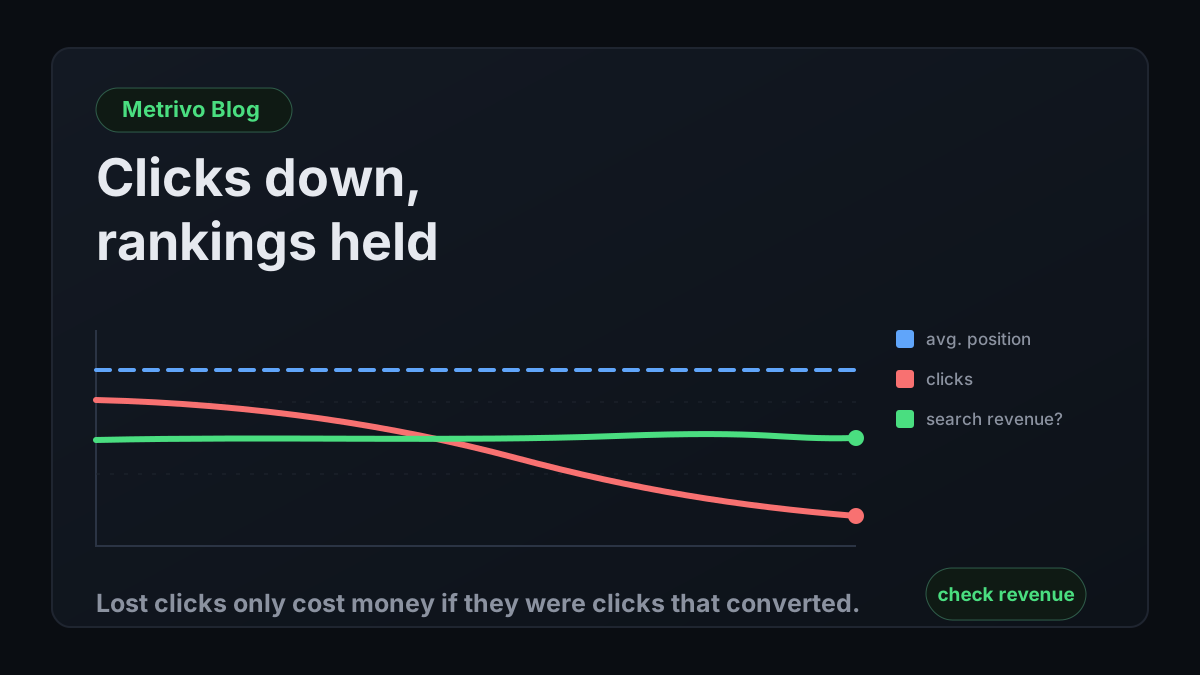
If your average position is roughly unchanged but clicks are down, fewer searchers are clicking at the same position. That is a click-through-rate shift, and the most common causes in 2026 sit on the results page itself rather than on your site.
Founders usually notice this in one of two ways. The analytics dashboard shows organic sessions sliding month over month, or someone opens Search Console and sees clicks trending down while the average position line barely moves. The instinctive reading is that the content got worse or a competitor overtook you. When position is stable, that reading is usually wrong, and acting on it wastes a quarter rewriting pages that were never the problem.
A page that keeps the same position but loses clicks is being seen and passed over more often. The searcher got an answer without visiting, or the results page gave them something more attractive to click than a blue link. Either way the problem lives in how the results page is composed, which you only partly control, and the right response is to find out whether the clicks you lost were clicks that ever turned into customers.
That last question is the one this guide is organised around. Clicks are an input. Revenue is the outcome. A drop in clicks that removed visitors who were never going to pay is an annoyance in a report. A drop that removed your best-converting landing sessions is a revenue leak, and it deserves the effort.
What the independent evidence says
Pew Research Center analysed the browsing of 900 US adults in March 2025. When a Google results page included an AI summary, users clicked a traditional result in 8 percent of visits, compared with 15 percent when no summary appeared. Clicks on the sources cited inside the summary happened in 1 percent of visits. Users also ended their browsing session on 26 percent of pages with an AI summary, against 16 percent of pages without one.
Seer Interactive tracked 3,119 informational search terms across 42 client organisations from June 2024 to September 2025. Organic click-through rate on queries that showed an AI Overview fell from 1.76 percent to 0.61 percent. Queries without an AI Overview also declined, from a peak of 3.14 percent in February 2025 to 1.62 percent in September 2025, which Seer reads as searchers increasingly finding answers elsewhere before they reach Google at all.
Both studies have limits that matter for a SaaS founder. Pew measured general browsing, not B2B software searches. Seer measured informational queries only, and states that commercial and transactional queries may behave differently. Your pricing, comparison, and integration pages often sit in exactly those commercial queries. Treat the studies as evidence that the pattern is real, not as an estimate of your own loss.
Four causes, four different signatures
Concise answer
AI answer absorption, reporting changes, tracking breaks, and genuine demand loss all produce falling traffic, but each leaves a different fingerprint across Search Console, your analytics, and your revenue.
The fastest way to stop arguing about a traffic drop is to look at three sources side by side: Search Console, which counts clicks Google sent; your analytics, which counts sessions your tag recorded; and revenue, which counts customers who paid. Each cause moves these three in a recognisable way.
| Cause | Search Console | Analytics sessions | Revenue from search | First check |
|---|---|---|---|---|
| AI answers absorbing clicks | Impressions steady, position steady, clicks and CTR down | Organic sessions down, roughly in line with clicks | Flat or down, depending on which queries lost clicks | Which queries lost CTR, and are they informational or commercial? |
| Reporting change | Impressions and position shift on a specific date, clicks largely steady | No matching change | No matching change | Does the break line up with a known reporting change such as mid-September 2025? |
| Tracking break on your site | Clicks steady | Organic sessions down, often suddenly | Payments continue but attribute less to search | Did a release, consent change, or redirect ship the same week? |
| Ranking loss | Impressions down, position worse, clicks down | Organic sessions down | Down if the affected pages converted | Which pages lost position, and to whom? |
| Demand or seasonal change | Impressions down across many queries, position steady | Down in line with impressions | Down if the season matters for buying | Does the same period last year show the same dip? |
Step one: confirm the drop in Search Console clicks
Concise answer
Start with Search Console clicks because Google counts them on its side. They do not depend on your tag firing, your consent banner, or your redirect configuration, which makes them the closest thing you have to a reference count.
Search Console defines a click as any click that sends the user from Google Search to a page outside Google, and an impression as a user having seen, or potentially seen, a link to your site. Google's documentation on AI features states that traffic from AI Overviews and AI Mode is reported within the Web search type of the Performance report, blended with ordinary results. Clicks from AI features are therefore already inside your numbers; they are just not labelled separately.
Compare matched periods. Use the same weeks of the previous year where you have the history, and at minimum compare whole weeks against whole weeks so weekday patterns do not create a phantom trend. A 28-day window that starts on a Monday compared with one that starts on a Saturday can produce a meaningful-looking change in a business with weekday-heavy traffic.
Watch for the September 2025 reporting break
Around 10 September 2025 Google stopped honoring the num=100 parameter, which rank-tracking tools had used to load a hundred results on a single page. Many sites saw impressions and average position change at that point. The widely reported explanation is that automated tools loading deep result pages had been generating impressions no human saw, and those disappeared. Whatever the mechanism, the effect is a step change in impressions and position that says nothing about real visitors.
If your year-over-year comparison spans that date, impressions and average position are not comparable across it. Clicks were far less affected and are the safer metric for any comparison that crosses mid-September 2025.
Split branded from non-branded queries
Filter queries containing your product name and look at them separately. Branded searches are people who already know you, and they rarely lose much to AI answers because the searcher wants your site specifically. If branded clicks are steady or rising while non-branded informational clicks fall, the loss is concentrated in top-of-funnel discovery, which may or may not have been converting.
A rising branded line alongside falling non-branded clicks can also mean discovery is happening somewhere else, such as an AI assistant answer, and people are arriving by searching your name afterwards. That is a hypothesis to test, not a conclusion, but it is one reason a click drop does not automatically mean fewer customers.
Step two: rule out a tracking break before blaming search
Concise answer
If Search Console clicks are steady but analytics shows fewer organic sessions, something on your side stopped recording or started misclassifying visits. Fix that first, because every later number depends on it.
Tracking breaks are common, quiet, and easy to mistake for an SEO problem. They usually coincide with a release rather than with any change on Google's side, so check the week the decline started against your deploy history. These are the usual suspects.
If organic sessions fell while direct sessions rose by a similar amount, suspect lost referrer information rather than lost visitors. The guide on direct traffic that is inflated covers how that misclassification happens and how to confirm it.
- The analytics tag missing from a new page template, such as a redesigned blog or a new docs site.
- A consent banner change that now blocks analytics until acceptance, lowering recorded sessions without changing real visits.
- A redirect between the bare domain and the www host that drops parameters or adds a hop that some browsers handle differently.
- A stricter referrer policy on your own pages or on an intermediate redirect, turning organic visits into direct ones.
- A single-page app change that stopped sending page views on route changes, so multi-page journeys collapse into one.
- A tracker loaded from a different host than the one your install documentation specifies, failing quietly on some routes.
Step three: ask the revenue question directly
Concise answer
Measure new paying customers and revenue whose sessions began on an organic search landing, over the same matched periods you used for clicks. That turns a traffic debate into a revenue decision.
Three numbers answer the question. First, the count of new paying customers whose attributed source is organic search. Second, the revenue from those customers. Third, the conversion rate of organic search sessions to payment, which tells you whether the visitors who still click are worth more or less than before. Compute all three for the period before the decline and the period after, using whole weeks.
Google's own documentation says that clicks from results pages with AI Overviews tend to be higher quality, with visitors more likely to spend longer on the site. That is a claim worth testing on your data rather than accepting or dismissing. If organic sessions fell by a third while organic-attributed payments held steady, your remaining visitors are converting better, and the lost clicks were mostly people who would have read and left.
Keep unattributed revenue visible while you do this. Some payments will not have a clear source, and if their share grows while organic-attributed revenue shrinks, the honest reading is that attribution got weaker, not that search stopped working. A general model for this kind of accounting is in the revenue attribution guide.
If clicks fell and revenue held
The lost clicks were mostly informational visits that rarely converted. Do not rewrite your highest-converting pages to chase them back. Instead, look at whether the pages that still bring paying visitors are getting the internal links, calls to action, and product paths they deserve. A common leak in this situation is blog traffic that reads and leaves without ever reaching a product page.
If clicks and revenue both fell
Find the specific landing pages that lost converting sessions. Rank landing pages by revenue in the earlier period, then compare their sessions and revenue in the later period. The loss is usually concentrated in a handful of pages, and those pages, not the whole site, deserve attention. Then check whether those pages lost position, lost click-through rate at the same position, or lost demand, because each has a different fix.
If revenue fell but clicks did not
This is not a search problem. Visitors are arriving at the same rate and converting less, which points to the funnel, pricing page, checkout, or payment flow. The funnel drop-off guide covers how to locate the step that changed. It is also worth confirming that your payment provider and your reporting agree, because a revenue drop that exists only in a dashboard is a measurement incident, not a business one.
What not to do while you investigate
Concise answer
Avoid changes that destroy the evidence you need: wholesale content rewrites, URL changes, and tracking migrations in the same weeks you are trying to measure a decline.
Changing many things at once makes the next measurement unreadable. If you rewrite twenty pages, change your analytics setup, and launch a new pricing page in the same month, any later movement has too many possible causes to learn from. Change one class of thing at a time and leave a few weeks between changes when the traffic volume allows it.
Be cautious with the most common advice for this situation, which is to restructure content so it is more likely to be cited inside AI answers. Seer's data shows cited brands receiving more clicks than uncited ones, but Seer itself notes it cannot prove that citation causes the higher click-through rate, since both may reflect underlying brand strength. Citation work may be worthwhile, but it is a bet, and it should be measured against revenue like any other bet.
Where Metrivo fits, and where it does not
Concise answer
Metrivo answers the revenue half of this investigation: which sources and landing pages produced paying customers, with a confidence label on every match. It does not track rankings and cannot see what happens inside an AI answer that never sends a visit.
Metrivo is built for SaaS founders who are their own growth team, which usually means the person reading Search Console is the same person who has to decide what to fix. The relevant parts of the product are specific and limited, and the list below is taken from the current implementation.
What it gives you for this question
The first-party tracker records sessions with their source, landing page, and campaign fields, and payments arrive from verified provider webhooks or the Manual Payment API. Each payment is matched to a source with a confidence label of high, medium, low, or unknown, and unattributed revenue stays visible rather than being assigned to a channel. That lets you compare organic-attributed payments and revenue across matched periods without exporting three systems into a spreadsheet.
A Search Console connection syncs query-level clicks, impressions, and position for the website, so the search side and the revenue side sit in one place. The revenue leak detector includes checks for blog traffic that does not reach product pages and for conversion-rate drops against the previous period, which are two of the outcomes described above. Confidence levels are defined in the attribution confidence docs.
What it does not do
Metrivo does not track rankings and is not a replacement for Search Console or a rank tracker. Its Search Console sync is at query level, so page-level diagnosis of position changes still happens in Search Console itself.
It cannot measure influence that never produces a visit. If someone reads an AI answer that mentions you and later types your URL, that visit arrives as direct or branded search, and Metrivo will not relabel it as AI-influenced without evidence. Revenue impact from zero-click exposure remains unknown, and any tool that reports it as known is estimating.
A one-hour review you can run this week
Concise answer
Six checks, in order, turn a vague traffic worry into a specific finding. Stop at the first check that explains the drop.
Work through these in sequence. Each one either explains the decline or narrows the remaining causes, and most investigations end before the last step.
- Compare Search Console clicks for matched whole weeks, and note whether the comparison crosses mid-September 2025.
- Compare analytics organic sessions for the same weeks. If clicks are steady and sessions fell, stop and fix tracking.
- Split branded and non-branded queries, and list the ten queries with the largest click loss.
- For those queries, check whether position changed. Same position with lower click-through rate points to the results page, not your content.
- Compare new paying customers and revenue attributed to organic search across the same weeks, with unattributed revenue shown alongside.
- Rank landing pages by earlier-period revenue and identify the few that lost converting sessions. Those are the only pages that need work now.
Frequently asked questions
Why is my organic traffic down when my rankings did not change?
Fewer searchers are clicking at the same position. The common causes are AI answers on the results page satisfying the query without a visit, other results features drawing the click, or a reporting change that shifted impressions and position without changing real visitors. Confirm the drop in Search Console clicks before assuming any of them.
Do AI Overviews clicks show up in Search Console?
Yes. Google states that traffic from AI Overviews and AI Mode is reported in the Performance report under the Web search type. It is blended with other search clicks, so it cannot be separated, but it is not missing from your totals.
Why did my impressions drop and average position improve in September 2025?
Around 10 September 2025 Google stopped honoring the num=100 parameter that rank-tracking tools used to load a hundred results per page. Many sites saw impressions and average position change at that point for reasons unrelated to real visitors. Use clicks rather than impressions or position for comparisons that cross that date.
How do I know if a traffic drop is costing revenue?
Compare new paying customers and revenue attributed to organic search for matched periods before and after the decline, and check the conversion rate of organic sessions to payment. If organic-attributed revenue held while clicks fell, the lost clicks were mostly visits that did not convert.
Should I rewrite content to win back clicks lost to AI answers?
Not as a first step. Identify which landing pages lost converting sessions and work on those. Rewriting pages whose lost clicks never converted spends effort without changing revenue, and changing many pages at once makes the next measurement unreadable.
Can Metrivo measure revenue influenced by AI answers that never send a click?
No. Metrivo attributes payments to sources it can observe, such as referrers, campaign parameters, and recorded sessions. Influence from an AI answer that leads to a later direct or branded visit is labelled direct or branded search, and its AI share remains unknown.